Executive Summary
Data wiping has evolved from “wiper malware on endpoints” to multi‑plane destruction that targets identity control planes, virtualization layers, storage primitives, and cloud objects, which is often through the abuse of legitimate administrative tools.
The most consequential change: attackers increasingly prefer irreversible impact over reversible encryption when their objective is sabotage, destruction, covering tracks, or geopolitical signaling.
Recent destructive operations show two recurring themes where threat actors shift from malware-based destruction:
- Wipe delivery through trusted admin channels – endpoint management frameworks, Group Policy Objects, Mobile Device Management, and hypervisor tooling, which makes detection harder and response windows shorter.
- Wiping “structures,” not just “files” – targeting Master Boot Record/GUID Partition Table/File Systems metadata, VMFS datastores, and backup/snapshot layers to collapse recovery options.
Impact – Data destruction and recovery inhibition
Threat actors deliberately delete, overwrite, or corrupt data, disk contents, and disk structures using native tools or administrative interfaces to cause immediate operational failure and irreversible data loss.
By destroying backups, snapshots, and recovery mechanisms, attackers ensure systems cannot be restored to a known-good state, maximizing disruption and prolonging business impact.
CPX Threat Intelligence emphasizes understanding data wiping techniques at a structural and control plane level because recent threat actor behavior shows that destruction is no longer delivered solely through bespoke malware. Modern campaigns increasingly abuse legitimate administrative tooling, identity privileges, and management planes to achieve rapid, large-scale, and often irreversible impact.
Technique 101 — MDM/Intune wipe abuse
This is one of the most important recent evolutions: attackers don’t need malware to wipe devices if they can control MDM.
Intune remote wipe is inherently destructive
Microsoft Intune remote wipe is one of the most powerful “destructive” capabilities available once identity and cloud admin access are achieved. EDR solutions such as Defender or CrowdStrike cannot be intervened since it’s a legitimate MDM wipe instruction issued by an authorized tenant.
Intune remote wipe enables synchronized, delayed destruction across geographies and device types, executing even after offline periods and triggering upon reconnection. By extending to BYOD and personally owned devices, it significantly amplifies blast radius and operational impact.
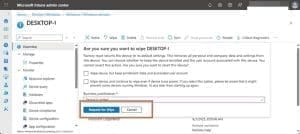
Figure – Sample image for Device Remote Wipe from Intune
Recently, an Iran‑linked “Handala” group conducted destructive operations by gaining access to Intune/Entra admin consoles and triggering remote wipe actions at scale.
In another instance in Singapore in August 2024, a compromise of the Mobile Guardian device management platform led to remote wiping of thousands of student devices after a security breach.
Defenders should closely monitor wipe actions, privileged role usage, and abnormal administrative sign-ins within managed MDM solutions, and baseline normal administrative activity to detect anomalies.
Technique 102 — Virtualization hosts and storage destruction
Threat actors target virtualization platforms, particularly VMware ESXi/vCenter-hosted environments. Hypervisors often have limited security tooling and reduced logging compared to full operating systems. In many environments, ESXi/vCenter hosts are implicitly trusted and excluded from aggressive monitoring to avoid performance or stability risks.
- VMFS data store destruction – Data deletion
Once the environment is compromised, threat actors target administrative control of the virtualization management plane which allows interaction with hosts and datastores. It is wide often by accessing the hosts and deleting VMFS volumes through stolen credentials on the compromised environment over SSH after enabling it on the console.
Administrative access to vCenter, ESXi and Storage devices should be closely monitored
Sandworm (APT44), who has repeatedly conducted destructive campaigns in Ukraine and is assessed to have deliberately targeted shared infrastructure and virtualized environments, using centralized control planes and wiper malware (e.g., HermeticWiper, CaddyWiper, ZEROLOT, Sting) to render large numbers of virtual workloads simultaneously unusable. In parallel, several ESXi-focused ransomware operators (including Babuklineage variants, AvosLocker, DarkBit, Akira, BlackCat/ALPHV affiliates) have explicitly targeted VMFS datastores, encrypting or corrupting VM-critical files such as VMDKs, VMX, and snapshot artifacts across entire datastores.
- Snapshot/backup and storage wiping – Recovery denial
Recovery denial is often achieved by removing snapshots and corrupting backup catalogs which invalidate point‑in‑time recovery options and break dependency chains between workloads and metadata
BlackCat Ransomware has capability to wipe VM snapshots
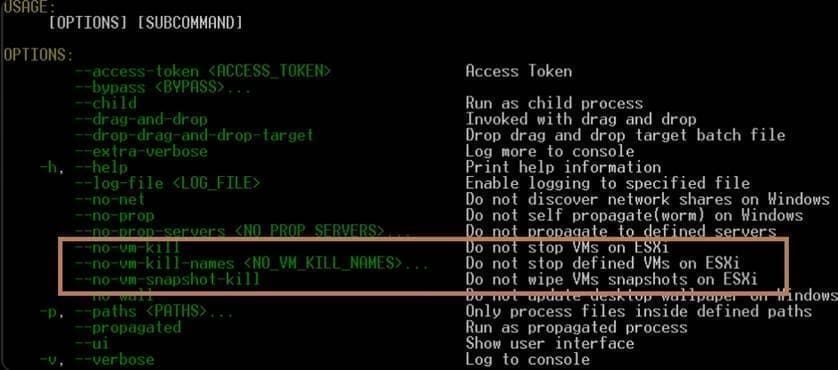
Figure – Blackcat configuration options
In a recent destructive incident attributed to the Iran-linked Handala group, the actor leveraged administrative access to storage and backup management planes and executed volume/dataset deletion actions to rapidly destroy primary data while simultaneously inhibiting recovery. The threat actor gained administrative access to multiple critical infrastructure systems listed below:
- IBM FlashSystem 7300 – storage array management
- Power10-HMC – hardware management console
- Quantum DXi4700 – de-duplication / backup appliance
- Veritas FlexAppliance Console – backup platform administration
- OneFS storage – scale-out NAS management
- PowerProtect DD System Manager – Data domain management
- Dell Data Protection Advisor – monitoring / reporting layer
- Unisphere – storage management interface
Defenders should treat these systems as Tier-0 recovery infrastructure and monitor aggressively for control-plane abuse. Prioritize audit logging and alerting on destructive administrative actions (volume delete, dataset delete, snapshot/catalog removal) and correlate these events with new or anomalous privileged sign-ins. Protect vCenter and ESXi administrative paths as Tier-0 identity assets, baseline normal operational activity to detect anomalies, and review logging configuration across all virtualization hosts to build actionable detection use cases. Enforce segregation of duties, just-in-time access, and restrict administrative access paths through PAM solutions wherever possible.
Technique 103 — Wiping using native Windows utilities and third-party tools
Threat actors often rely on native Windows utilities and native APIs that interact with volumes, file systems, and storage management. These tools are digitally signed by Microsoft, widely used by administrators, and rarely blocked by security controls.
APT28 (also tracked as Fancy Bear/Sofacy) has been observed abusing cipher.exe, a legitimate Windows utility, as part of post-operation cleanup and anti-forensic activity rather than as a primary destructive wiper.
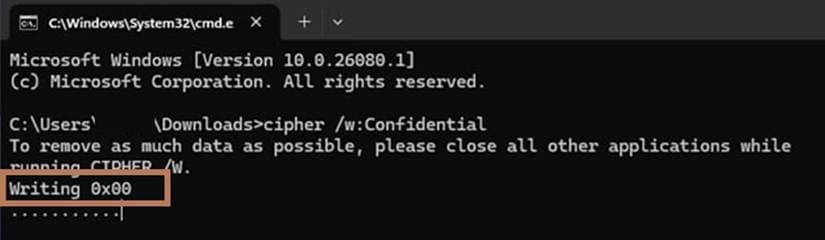
Figure – Cipher.exe usage
Native Windows utilities abused for disk wiping/destruction
These tools are Microsoft-signed, preinstalled, and commonly abused as Living Off the Land (LOLBins) in both wiper and anti-forensic operations.
- cipher.exe /w – Securely overwrites free disk space; used for anti-forensics and post-operation cleanup
- fsutil.exe – Manipulates NTFS metadata and volume state
- mountvol.exe – Dismounts volumes and removes mount points
- chkdsk.exe – Can be abused to force destructive repair on corrupted file systems
- vssadmin.exe – Deletes shadow copies to prevent recovery
- diskshadow.exe – Scripted manipulation and deletion of shadow copies
- wbadmin.exe – Deletes system state and backup catalogs
- robocopy.exe /MIR – Mirrors empty directories to wipe data
- del / erase – Mass deletion of files at scale
- wevtutil.exe cl – Clears event logs to hinder forensic investigation
Multiple custom toolsets and third-party tools are also available to perform the same destruction, threat actors leverage these since most of the EDR whitelist these products.
DeleteShadowCopies, developed from the legacy vshadow.
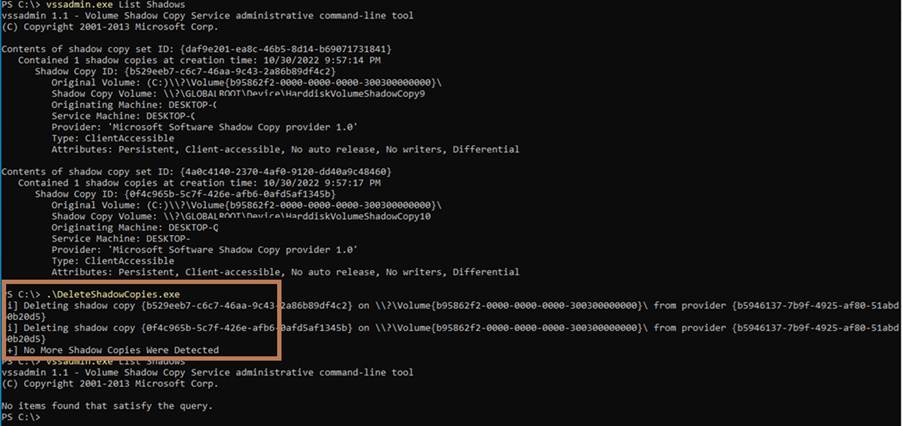
Figure – DeleteShadowCopies – another custom tool
In a recent destructive incident attributed to the Iran-linked Mobir group, the actor used Macrorit Data Wiper to wipe the hard drive for multiple systems in the network.
Defenders should classify securewipe activity as Impact-stage behavior and closely monitor the use of native utilities and custom or third-party tools, establishing baselines based on legitimate administrative and operational use to detect anomalies.
Technique 104 — Destruction delivered via enterprise admin frameworks
GPO‑based deployment
Once domain control is achieved, attackers can modify existing GPOs or create new ones to push startup scripts, scheduled tasks, service modifications, or software deployment policies
Threat actors typically first deploy GPOs to disable endpoint security controls, delete shadow copies, stop backup agents, or modify boot and recovery settings, followed by a second wave that executes disk-level destruction or file overwrites.
DynoWiper was deployed using Active Directory Group Policy by Sandworm Group in the Polish energy sector in December 2025, implying domain‑level control and a “push once, wipe everywhere” delivery model.
Defenders should closely audit and monitor GPO-related changes, relevant event IDs, and establish baselines of normal activity before monitoring for anomalies.
|
Event ID |
Description |
|
5136 |
A directory service object was modified — used to detect GPO setting changes and GPO link/unlink operations |
|
5137 |
A directory service object was created — new GPO created |
|
5141 |
A directory service object was deleted — GPO deleted |
|
5139 |
A directory service object was moved — GPO renamed or moved |
|
4663 |
An object was accessed — changes to GPO files in SYSVOL (GPT.ini, registry.pol, scripts) |
Endpoint administration framework abuse
Once SCCM infrastructure or its administrative accounts are compromised, typically after domain level access is achieved, threat actors often weaponize it for collections, task sequences, and deploy scripts
Russian-linked Sandworm operations in Ukraine leveraged centralized Windows management mechanisms (including domain-wide deployment infrastructure analogous to SCCM) to distribute destructive payloads at scale
Wiper malware such as HermeticWiper, CaddyWiper, and SwiftSlicer exemplify this model, where the malware itself focuses purely on disk and system destruction. These wipers overwrite MBRs, corrupt NTFS structures, or delete critical data.
Talos observed PathWiper being deployed through a legitimate endpoint administration framework
Defenders should protect and monitor the management plane, as payloads are delivered through trusted channels. Monitoring should include GPO change control, endpoint management console auditing, and privileged access governance—not just endpoints.
Technique 105 — Partition and disk utilities used as wipers
Threat actors deliberately target and destroy disk structures by corrupting low-level components such as the MBR and NTFS metadata, rendering systems unbootable and data irrecoverable.
These tools are Microsoft-signed, pre-installed, and commonly abused as living off the land (LOLBins) for wiping activity.
- diskpart.exe – Deletes partitions, cleans disks, and removes volume structures
- format.com – Formats volumes, destroying file system structures
- bcdedit.exe – Alters boot configuration, potentially rendering systems unbootable
PathWiper targeting Ukrainian critical infrastructure, overwriting MBR and NTFS artifacts and attempting to dismount volumes.
After enumerating all available storage media, PathWiper targets multiple low-level attributes associated with the New Technology File System (NTFS), including the Master Boot Record (MBR), $MFT, $MFTMirr, $LogFile, $Boot, $Bitmap, $TxfLog, $Tops, and $AttrDef.
Detection should extend beyond malware to include large-scale disk or partition operations initiated from anomalous admin sessions, remote management frameworks, or scheduled tasks.
Technique 106 — Raw disk overwrite via drivers
Threat actors often leverage third party drivers compared to developing a custom kernel driver for disk‑wiping operations. This technique has been observed in multiple destructive campaigns such as Destover, Shamoon, Dustman, and ZeroCleare which leverage variants of the Eldos ElRawDisk driver, while others like DriveSlayer rely on drivers from commercial disk utilities (e.g., EaseUS).
Known .sys drivers abused for disk wiping activity
- elrawdsk.sys – EldoS Raw Disk driver used to overwrite MBR, partitions, and NTFS metadata
- rwdsk.sys – Alternate filename/version of the EldoS Raw Disk driver
- epmntdrv.sys – EaseUS partition/disk management driver abused for raw disk access
- VBoxDrv.sys – Oracle VirtualBox kernel driver exploited to bypass Driver Signature Enforcement (DSE) in support of loading destructive disk wiping drivers
- assistant.sys – Vulnerable helper driver dropped alongside VBoxDrv for driver loading abuse.
Defenders should closely monitor the loading of these unusual drivers, particularly from nonstandard or suspicious locations, and establish usage baselines to detect anomalies. Additionally, users should be restricted to the least privilege access model.
Technique 107 — Cloud control‑plane deletion
After obtaining elevated administrative privileges in Entra ID, AWS IAM, or GCP IAM, adversaries increasingly use native cloud interfaces (living off the cloud – portal, CLI, PowerShell, SDKs) to delete or permanently modify resources, destroy cloud backups, and redefine the attack as cloud-native extortion and destruction.
Microsoft has documented Storm0501 pivoting from endpoint encryption to cloud-native ransomware, where the group deleted Azure backups and resources using Azure tools after identity compromise
Scattered Spider/Octo Tempest compromising cloud IAM and administrative roles, then using legitimate APIs to manipulate or destroy resources as part of extortion and ransomware operations.
Defenders should ensure recovery readiness by implementing immutable backups and segregated control planes, including break glass accounts, protected backup tenants, deletion protection, and monitor unusual logins.
Detection and hunting
Identity Intune wiping activity
Alert on unusual admin sign-ins followed by remote wipe actions.
|
// CPX: Intune – Device Wipe (enriched) // Requires: IntuneAuditLogs and IntuneDevices in Sentinel workspace let lookback = 7d; IntuneAuditLogs | where TimeGenerated > ago(lookback) | where OperationName =~ “wipe ManagedDevice” | extend TargetObjectIds = parse_json(tostring(parse_json(Properties).TargetObjectIds)) | extend DeviceId = tostring(TargetObjectIds[0]) | extend ActorUPN = tostring(Identity) | project TimeGenerated, ActorUPN, OperationName, DeviceId, Properties | join kind=leftouter ( IntuneDevices | where TimeGenerated > ago(lookback) | summarize arg_max(TimeGenerated, *) by DeviceId | project DeviceId, DeviceName, Model, SerialNumber, OS, UserEmail, Ownership, ManagedBy, LastContact) on DeviceId | project TimeGenerated, ActorUPN, OperationName, DeviceId, DeviceName, Model, SerialNumber, OS, PrimaryUser=UserEmail, Ownership, ManagedBy, LastContact | order by TimeGenerated desc |
Identity Intune wiping spike
Alert on unusual spike of wiping activity, modify the wipeCount as per Organization monitoring threshold
|
// CPX: Intune – Wipe Spike Detection // modify the threshold in the query based on monitoring threshold let window = 1h; let threshold = 5; // tune per tenant size IntuneAuditLogs | where TimeGenerated > ago(180d) | where OperationName =~ “wipe ManagedDevice” | extend ActorUPN = tostring(Identity) | summarize WipeCount=count(), Devices=make_set(tostring(parse_json(tostring(parse_json(Properties).TargetObjectIds))[0]), 50) by ActorUPN, bin(TimeGenerated, window) | where WipeCount >= threshold | order by WipeCount desc |
Identity suspicious loading of .sys files
Alert on unusual loading of .sys files which are being abused for wiping activity
|
// CPX: Suspicious loading of .sys files DeviceImageLoadEvents |
Identity suspicious file creation of .sys files
Alert on unusual file creation of .sys files which are being abused for wiping activity
|
// CPX: Suspicious File Creation of .sys files DeviceFileEvents |
Identity suspicious usage of disk wiper products
Alert on suspicious usage of disk wiper products which are being abused for wiping activity
|
// CPX: Suspicious Usage of Disk Wiper Products let lookback = 30d; | where InitiatingProcessVersionInfoCompanyName contains “wiper” or InitiatingProcessVersionInfoInternalFileName contains “wiper” or InitiatingProcessVersionInfoOriginalFileName contains “wiper” or InitiatingProcessVersionInfoProductName contains “wiper” | project TimeGenerated, DeviceName, FileName, FolderPath, SHA256,InitiatingProcessVersionInfoCompanyName, |
Identity suspicious usage of Windows native tools
Alert on unusual usage of Windows native tools which are being abused for wiping activity. Review the logs to exclude the activity from administrators
|
// CPX: Suspicious Usage of Windows native tools DeviceProcessEvents |
CPX recommended resilience controls
- Protect the management plane: Treat MDM, endpoint admin, and hypervisor & cloud admin consoles as Tier‑0 systems.
- Phishing‑resistant MFA & Conditional Access for privileged roles: Secure the identity with MFA before attackers’ takeover and do catastrophic damage.
- Immutable, offline, and cross‑plane backups: Isolation is the priority task for securing the backups and ensuring it’s immutable.
- Change control and monitoring for GPO/endpoint admin systems: Audit and alert on suspicious activities on the trusted channels.
- Virtualization hardening: Segment vCenter/ESXi, restrict admin access paths, and monitor destructive datastore/snapshot operations.